SleepCast app logo SleepCast Support

SleepCast

Counting sheep is overrated :)

Now available in the Apple App Store

Download on the App Store

Introduction

Built for people who fall asleep to podcasts

SleepCast is a smart podcast player that adapts in real time while you fall asleep, wake up, and continue listening. It combines adaptive sleep timer logic, motion-aware playback, AI summaries, bookmarks, statistics, and practical queue automation into one flow.

I built this app because I fall asleep listening to podcasts, and I wanted a flow that adapts to me instead of forcing me to manage it.

I set a 7-minute sleep timer. After 6 minutes, motion detection turns on; if I'm still awake, I just move a little and the timer automatically extends by another 7 minutes. When I'm drifting off and the timer ends, the app fades into a calming soundscape for 5 minutes. If I move again, the podcast resumes and the 7-minute timer is extended. If I've truly fallen asleep, the soundscape stops after those 5 minutes and motion detection turns off, so the podcast won't suddenly start playing when I roll over in my sleep.

If I wake up during the night, I simply press play on my headphones. The app reads out the current time and a short recap of the last 2 minutes, then continues the episode with the sleep timer reset to 7 minutes.

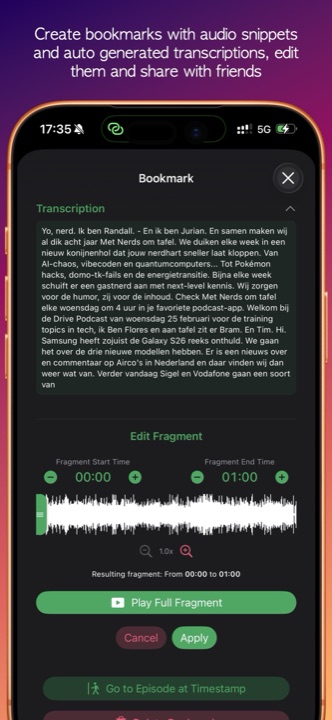
And when I hear something worth saving, I quickly press volume up and back down: the app creates a bookmark, captures a 1-minute audio clip, and generates a transcript, so I can review or listen to it in the morning.

Later, I can check listening and sleep timer statistics, adjust the app theme palette, fine-tune my inbox and notification behavior, and keep improving the flow instead of starting over each night.

Core Capabilities

Everything working together in one app

Sleep Timer
Motion Detection
AI Summaries
Bookmarks
CarPlay
View Feature Guide

Adaptive Sleep Flow

SleepCast gives you precise sleep behavior instead of a static timer.

AI Summaries & Transcript Workflows

Create summaries and transcripts for episodes or queue batches.

Statistics & Listening Insights

Track how you listen over time and how your sleep timer behavior changes.

Feature Guide

Complete support overview

Discovery & Subscriptions

  • Search podcasts and open chart-based discovery by country, so you can find relevant shows for your language/region faster.
  • Browse top podcasts and top episodes to discover both long-term favorites and currently trending single episodes.
  • Import/export OPML subscription lists when migrating from another podcast app or creating a backup of your library.
  • Add manual feed URLs for podcasts that do not appear in search but do provide a valid RSS feed.
  • Manage and remove subscriptions to keep your inbox focused on podcasts you currently listen to.
  • Use the inbox as a latest-episodes view that can be refreshed, cleaned up, and sent straight to the queue.

Sleep Timer & Wake Flow

  • Choose a countdown timer or stop playback automatically at the end of the current episode.
  • Auto-restart on play lets you resume quickly when you wake up and want the timer armed again immediately.
  • Fade-out, sleep window, beep volume, and motion sensitivity controls let you tune the behavior to your routine.
  • Extended motion monitoring and optional soundscapes help bridge the gap between falling asleep and waking up again.
  • Resume announcements can speak the current time and a short recap before playback continues.

Player & Queue

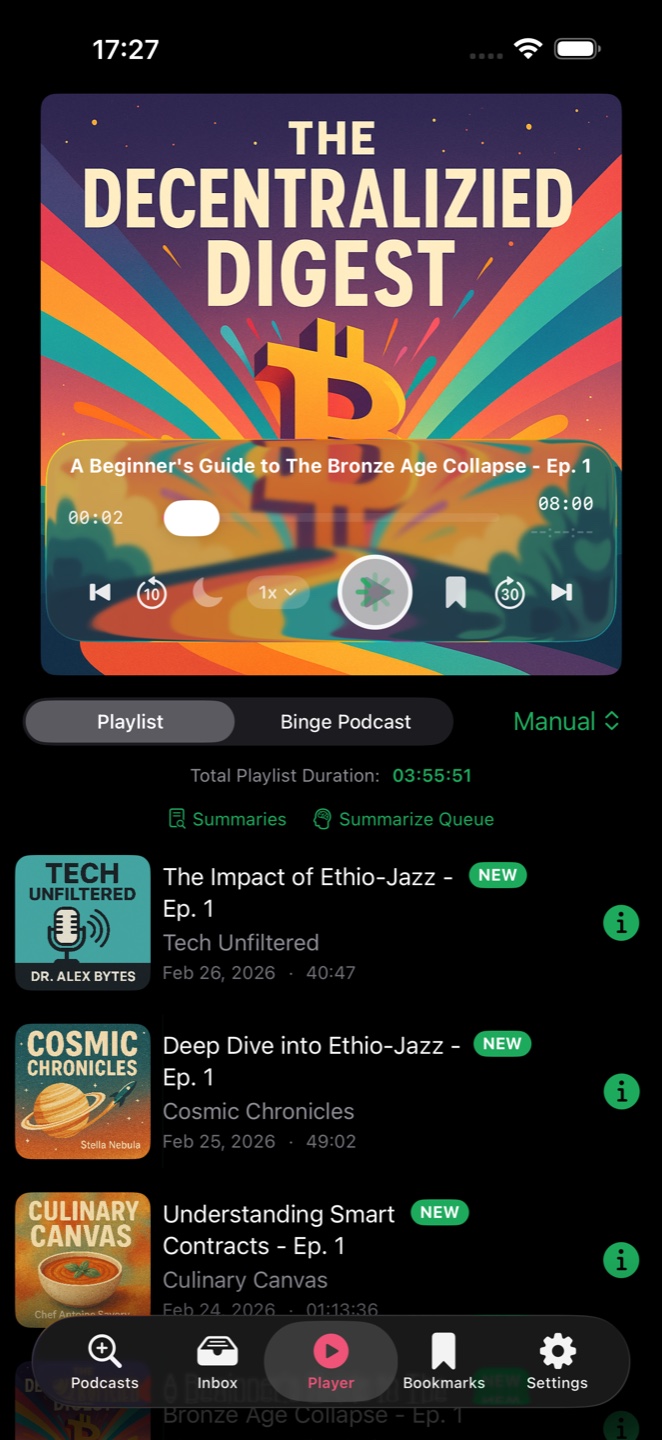
  • Playlist mode and binge mode let you switch between mixed listening and one-show-at-a-time listening sessions.
  • Queue sorting options and quick swipe actions help you reorder, summarize, download, or clean up episodes in seconds.
  • Chapter list navigation jumps directly to structured timestamps when chapter metadata exists in the episode feed.
  • Skip interval customization and playback speed control let you match pacing to your routine, from focus listening to bedtime.
  • Mark unplayed, move to top, or remove from queue so your next-up list always reflects what you want to hear now.

Bookmarks, Fragments, Sharing

  • Create bookmarks while listening to capture exact moments without interrupting playback.
  • Optional automatic audio fragment capture stores a short clip around the bookmark for quick replay later.
  • Choose bookmark rewind and fragment duration so clips match the way you save memorable moments.
  • Automatic bookmark fragment transcription adds searchable text to saved moments.
  • Volume-up/down gesture bookmarking workflow gives you a fast hardware-button shortcut when the screen is locked or out of reach.
  • Review bookmark details and replay saved moments to revisit tips, quotes, or key points the next morning.
  • Export/share saved moments as needed when you want to keep or send clips outside your regular queue flow.

Downloads, Notifications, CarPlay

  • Episode downloads with Wi-Fi-only option help you keep episodes available offline while controlling mobile data use.
  • Downloaded episodes list and cache cleanup make it easy to free storage and keep only what you still need.
  • New-episode notification controls, permission status, and indicator toggles let you decide how visible alerts should be in-app and at system level.
  • Hourly checks, last-check feedback, and an in-app test check help you verify that new episode monitoring is working.
  • CarPlay tabs for now playing, queue, and podcasts provide safer in-car control with minimal phone interaction.

Statistics & Progress

  • Open listening statistics from the player to review trends across sessions.
  • See your habits by period, including time spent listening, time-of-day patterns, and top podcasts or categories.
  • Open sleep timer statistics separately from settings to review timer-related behavior without mixing it into general listening data.
  • Replay the statistics tutorial whenever you want a refresher on the charts.

Experimental Audio Tools

  • Speed-sensitive volume for cycling/driving modes dynamically adapts loudness when ambient noise rises with speed.
  • Custom min/max volume bands by speed zone let you tune comfort and audibility for your own commute profile.
  • Sudden sound suppression with adjustable thresholds reduces harsh spikes and keeps nighttime listening gentler.

Settings Overview

  • Language, appearance mode, and theme palette options let you localize the app and personalize its visual style.
  • Tutorial replay, AI help, and statistics tutorial screens help new users onboard quickly and let advanced users revisit complex workflows.
  • Sleep, bookmarks, player, downloads, inbox, podcasts, AI, and notifications are grouped so you can tune each workflow in one place.

Tips & Tricks

Use SleepCast more effectively

Set timer, fade-out, motion settings, extended monitoring, and soundscape once. A stable setup improves sleep consistency and reduces nightly friction.

Troubleshooting

Common issues and quick checks

Legal

Privacy Policy

Last updated: March 4, 2026.

Data Stored by the App

  • Subscriptions, queue state, playback progress, bookmarks, settings.
  • Downloaded episodes and optional bookmark audio fragments.
  • Listening statistics and sleep timer event history used for in-app charts.
  • Generated summaries and transcription output when you use AI features.

Apple Services

  • Data may sync via your Apple iCloud environment depending on your device/account setup.
  • Notifications are delivered through Apple notification infrastructure when enabled.

Location and Motion

  • Speed-sensitive volume uses location/speed data only for that feature.
  • Sleep/motion behaviors use movement signals for timer logic and resume decisions.

Your Controls

  • Disable notifications, location-related features, or AI processing in Settings.
  • Delete summaries, bookmarks, queue items, and cached downloads in-app.
  • Manage app permissions in iOS Settings.

Contact

Support

Need help with SleepCast? Reach us at:

sleepcast@turen.nl

Expected first response: within 48 business hours.

Want to know more about SleepCast?

Download on the App Store Contact Support